
Office 365: Inspire, Engage, Collaborate for free
In order to help you have a successful year, we're providing Office 365 to every faculty member and student at our school free of charge. With Office 365, you will have access to the latest version of Word, Excel, PowerPoint, OneDrive, Co-Pilot and much more to help you both in the classroom and office. And with students using the same programs, you can easily share materials electronically without file fidelity issues.
Accessing Office 365
You may login into your Office 365 email thru a link in your MyCom portal. You can access online versions of all of the apps using direct URLs like outlook.office.com and excel.officecom. The link portal.office.com will take you to the office Portal and a Co-Pilot window. On the left hand tool bar in the portal there is a choice for "Apps". If you don't see the left tool bar, expand your browser window until it appears.
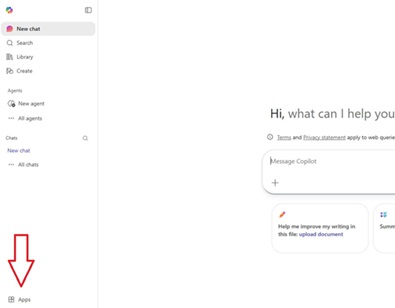
Click on "Apps" and you will get a screen listing the most common apps and offering a choice to find more.
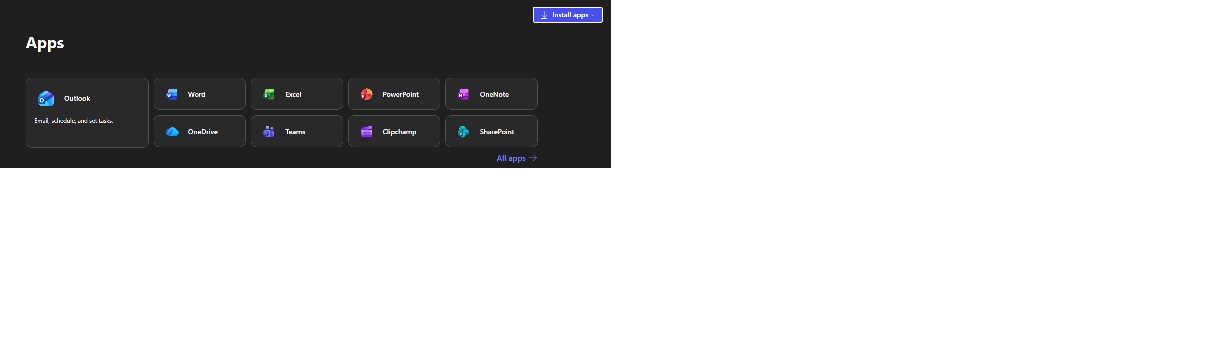
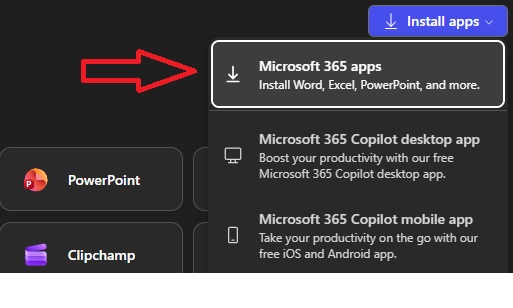
To install the desktop versions of the software, simply select "Install Apps" from the upper right corner of the "Apps" page and select "Microsoft 365 Apps". This will download the installer for the regular office suite. Once the file is downloaded, simply double-click to install.
 Azure Dev Tools for Teaching is a program that supports technical education by providing access to Microsoft developer tools, for learning, teaching and research purposes. The program subscription includes Microsoft Visual Studio, Visio, Project, and more. Students may download the software applications at reduced or no cost. Click here to enter the Azure webstore.